
If you’re shopping for a Customer Relationship Management (CRM) system, software that handles patient communication, tracks marketing, and keeps everything organized, you’ve probably noticed most weren’t built for healthcare. They’re designed for generic businesses and fall short on the workflows medical practices actually need.
They’re designed for sales teams, real estate agents, or e-commerce stores. And while they might have impressive feature lists, they fall short when it comes to patient communication, HIPAA compliance, and the specific workflows medical practices actually need.
The result? Practices end up paying for multiple tools (one for email, another for scheduling, a third for review requests) or they settle for a CRM that creates more work than it eliminates.
So what should you actually look for in a medical practice CRM?
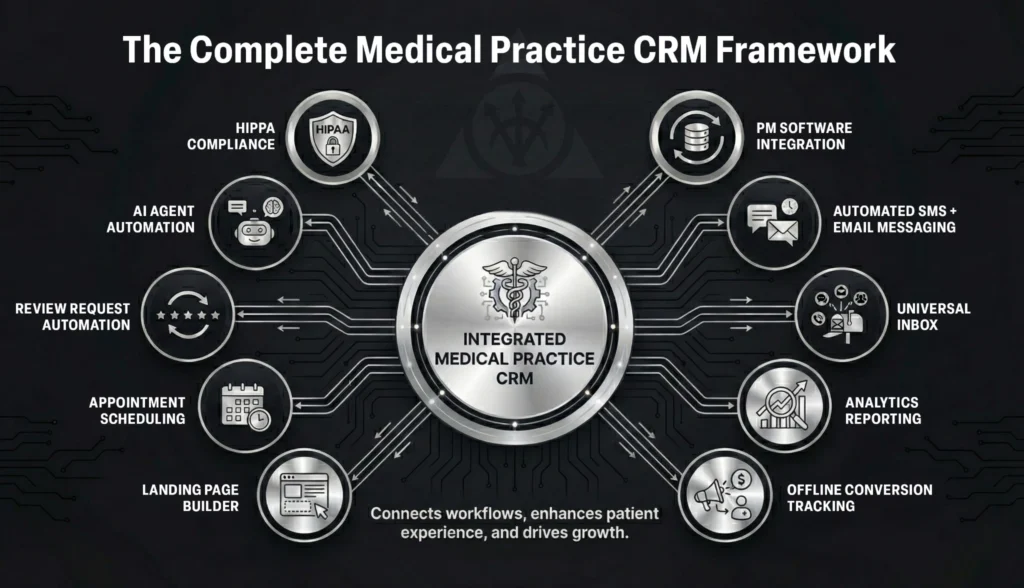
Here are the top 10 criteria that separate systems built for healthcare from generic business software.
The Top 10 CRM Criteria for Medical Practices
HIPAA Compliance
This one’s obvious, but it needs to be first.
If your CRM isn’t HIPAA compliant, you’re risking patient privacy and opening yourself up to serious legal consequences.
Automated SMS + Email Messaging
Your front desk shouldn’t be manually sending appointment reminders at 9 AM every morning.
A proper CRM automates patient communication: appointment confirmations, pre-appointment instructions, post-visit follow-ups, procedure education sequences, and re-engagement campaigns for patients who haven’t been in recently.
The goal isn’t just automation for automation’s sake. It’s creating consistent, timely patient communication without adding to your staff’s workload. Two-way SMS conversations where patients can reply, email sequences triggered by patient actions, and procedure-specific education campaigns should all run automatically.
Offline Conversion Tracking (Google Ads + Meta Integration)
Most practices know how many clicks their ads generate. Very few know how many of those clicks became actual patients.
CRMs that connect with Google Ads and Meta Ads can send offline conversion data back to the platforms. That means your ads get smarter over time, optimizing for people who actually book appointments, not just people who click. The result: lower cost per acquisition and better ad performance.
AI Agent Components
This is the future, and it’s arriving faster than most practices realize.
AI-powered features like chatbots that answer common questions, voice agents that handle appointment scheduling calls, and automated FAQs are becoming standard. Early adopters are reducing administrative burden while improving patient experience.
If your CRM has AI capabilities (or is adding them), you’re future-proofing your practice.
Review Request Automation
Your reputation determines whether new patients choose you or your competitor down the street.
CRMs with built-in review automation can send personalized review requests at the right moment (usually 24-48 hours post-appointment), with direct links to Google, Yelp, or Healthgrades.
Practices that automate review requests see 3-5x more reviews than those relying on manual tasks.
Practice Management Software Integration
Here’s where most CRMs fail medical practices: they don’t connect to your existing practice management system.
That means your team is manually entering patient information in two places, or worse, your marketing data lives completely separate from your patient records. You can’t see which marketing efforts actually result in appointments, and your follow-up workflows are disconnected from patient status.
When your CRM and PM software talk to each other, you stop playing the data entry game and start seeing real ROI on your marketing. Automatic patient syncing, appointment booking that reflects in both systems, and trigger-based communication based on patient status become possible.
Appointment Scheduling
When a potential patient is ready to book, make it easy.
Integrated scheduling tools let patients book directly from your website, landing pages, or email campaigns. No phone tag. No “call us during business hours.” Just instant bookings that sync with your calendar. This reduces front desk workload and increases conversion rates.
Landing Page Builder
Campaign pages need constant testing and refinement to maximize conversions.
Built-in landing page builders let you launch and optimize procedure-specific pages, promotional campaigns, and lead magnets without development delays. Everything connects directly to your CRM, so leads flow automatically into your follow-up sequences.
Universal Inbox
If your team is checking texts in one place, Facebook messages in another, web form submissions in a third, and phone calls in a fourth, you’re going to miss patient inquiries.
A universal inbox consolidates every patient communication channel into one view: SMS, email, web chat, social media messages, and even voicemail transcriptions.
Nothing falls through the cracks. Any team member can see the full conversation history. Response times improve dramatically. Patients get consistent answers regardless of channel.
Practices that implement a universal inbox typically see 30-40% faster response times and fewer missed inquiries.
Analytics and Reporting
You can’t improve what you don’t measure.
Most practices are spending money on Google Ads, SEO, social media, and referral programs, but they have no idea which channels are actually producing patients.
Your CRM should show you which marketing sources generate the most appointments, your cost per patient acquisition by channel, conversion rates from inquiry to scheduled appointment, patient lifetime value by acquisition source, and campaign performance and ROI.
Without this data, you’re guessing. With it, you can double down on what works and cut what doesn’t.
What About “Easy to Use”?
You’ll notice “easy to use” isn’t on the list.
That’s because it’s not a feature. It’s a baseline requirement.
If your CRM is powerful but your staff won’t use it because it’s too complicated, you’ve wasted your money. The best CRM is the one your team will actually adopt.
During your evaluation, request a demo with actual team members present. Ask about onboarding and training support. Test the interface yourself. Talk to current users about their learning curve.
A slightly less feature-rich CRM that your team uses every day beats a powerful one that sits ignored.
The Bottom Line
When evaluating CRMs for your medical practice, use these 10 criteria as your checklist. The systems that check the most boxes aren’t just more feature-rich. They’re the ones that will actually solve your problems and support your growth.
Focus on the fundamentals first. Make sure it actually solves your problems before you get distracted by flashy features you’ll never use.
And if you want help auditing your current setup or choosing the right system, we do this every day. Book a call and we’ll walk you through exactly what you need.
About SILVR
We specialize in implementing GoHighLevel CRM for medical practices. Our HIPAA-compliant configurations automate patient communication, integrate with your practice management software, and replace multiple tools with one streamlined system. Whether you’re new to CRM or ready to upgrade, we’ll customize GoHighLevel to fit your practice’s exact needs. Explore our CRM services.